Enhance Productivity with Microsoft Copilot for M365
Copilot is a Microsoft AI tool that serves the enterprise. There are multiple versions of Copilot, including the free Copilot on the web version available to all users and Copilot for M365, available for a fee.
Copilot for M365 is integrated into Microsoft 365 and works alongside you, embedded in apps like Outlook, Teams, Word, PowerPoint, and Excel to augment creativity, productivity, and skills. You decide what to keep, modify, or discard. Copilot for M365 can help you be more productive in Outlook, more collaborative in Teams, more creative in Word, more expressive in PowerPoint, and more analytical in Excel.
Guidance
Johns Hopkins users must log into Copilot for M365 with their JHED ID in order to properly protect all data and information.
Access
- Copilot on the web is free, is not HIPAA-compliant, and is not connected to your M365 apps or data.
- Copilot for M365 is available to order for a fee from the Software Catalog. This version is HIPAA-compliant and connects with your M365 apps and data.
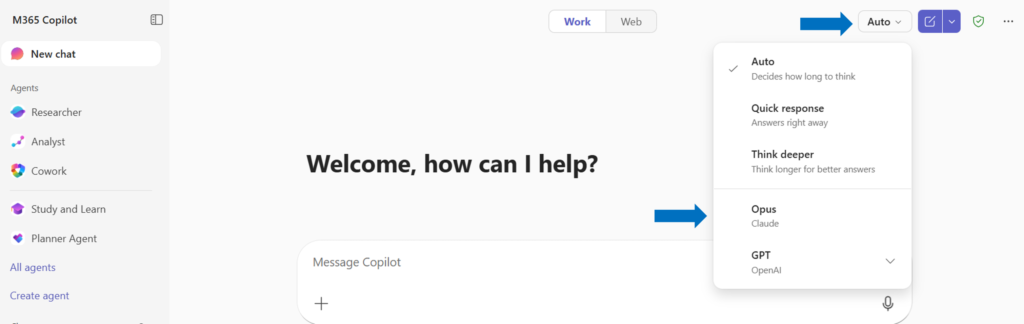
- To change the model, go to the upper right corner of the Copilot app and make a selection from the dropdown menu.
Copilot for M365 in Outlook
- Provide personalized suggestions, summaries, and insights
- Draft an email based on a short prompt adjust length and tone to sound more like you
- Schedule a meeting
- Summarize long email threads and offer suggested actions
- Keep on top of action items for meetings you can’t attend
More about Copilot in Outlook
Copilot in Outlook FAQ
Copilot for M365 in Teams
- Record meetings, provides transcripts, details speakers
- Provide summaries and action items for meetings, even ones you can’t attend
- Give detailed responses to your questions about the meeting
- Answer questions and summarizes chat conversations
- Offer suggested actions in chat
More about Copilot in Teams
Copilot in Teams FAQ
Copilot for M365 in Word
- Help create content based on your prompt and any associated files
- Add content to existing documents
- Summarize text
- Rewrite document sections
- Reformat appearance and styles to look like other documents when prompted
- Transform text into tables
More about Copilot in Word
Copilot in Word FAQ
Copilot for M365 in Excel
- Analyze data and summarize trends in tables
- Highlight, sort, and filter tables to call attention to important details
- Reveal data correlations and suggest new formulas
- Answer questions and provides what-if scenarios
- Create graphs of insights
More about Copilot in Excel
Copilot in Excel FAQ
Copilot for M365 in PowerPoint
- Create a presentation based on a Word document or a simple prompt
- Add or adjust slides
- Generate speaker notes
- Provide a summary of a presentation
- Answer questions based on the content in a presentation
More about Copilot in PowerPoint
Copilot in PowerPoint FAQ